How To Add Domain In Webmin Control Panel - In 10 Easy Steps
The purpose of this tutorial is to demostrate step by step on how to add a virtual host domain name in the Webmin Control Panel. I use these steps frequently whenever I purchase a new domain and have to add a domain for my new site in my virtual server on the cloud. My friend also uses these steps because he has a server with Amazon with CentOS linux. I have never tried it on a windows server, but I would imagine it works the same since the configuration changes you are making are within webmin and not the operating system itself.
If you purchased a dedicated server from Webune. You can install an Open Source Domain Name Control panel for free, its called webmin, Webune Dedicated Servers are Reliable - to add a domain name to you server this is the procedure:
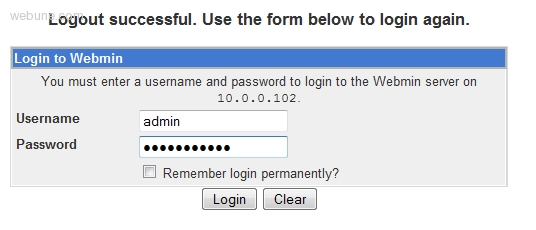
1. login to your webmin panel:
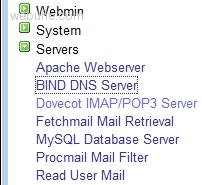
2. click on Servers then BIND DNS Server
NOTE: if you get: The primary configuration file for BIND /var/named/chroot/etc/named.conf does not exist, or is not valid. Create it? - select 'Setup as an internet name server, and download root server information' and then go ahead a click the 'Create Primary Configuartion File and Start Nameserver' button. Once you have clicked on the button, you will see the icons.
3. under 'Existing DNS Zones' click on 'Create master zone.' and populate the following fields: -
- Zone type [ Forward ] -
- Domain name / Network [ Enter Domain Name you wan to add ] -
- Records file [Automatic] -
- Master server [you server's host name] -
- Email address [admin's email address] -
- Use zone template? [No] -
- IP Address for template records // Provide the host's IP Address -
- Add reverses for template addresses? [yes] -
- Refresh time [Leave as is] - Expiry time [Leave as is]
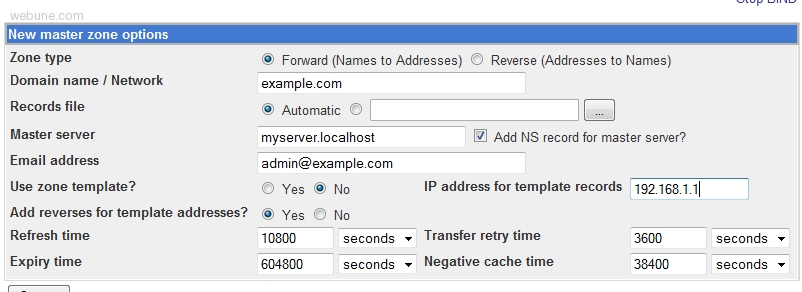
Click: [Create] Button after you have populated each field

4. When you click on 'Create' button, it will create your zone and it will direct you to 'Edit Master Zone' page. In the 'Edit Master Zone' page, click on the 'Address(0)' button:

5. In the 'Address Records' page, populate the following: -
- Name [www] -
- Address [Server's Ip Address] -
- Time-To-Live [Default] -
- Update reverse? [yes]

- Click 'Create' after you created the address record, click on 'Return to record types' link at the bottom -
- At the top menu you will a link that says 'Apply Configuration' click on it to apply the changes you have made.

6. Now that we have added your domain name to your DNS server, its time to create a virtual host in your Apache server so in the Servers category, click on 'Apache Webserver' link
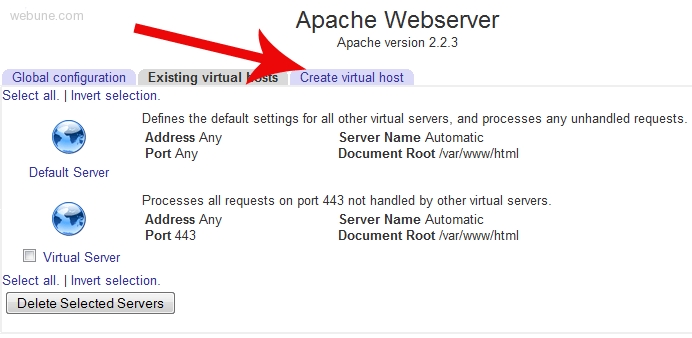
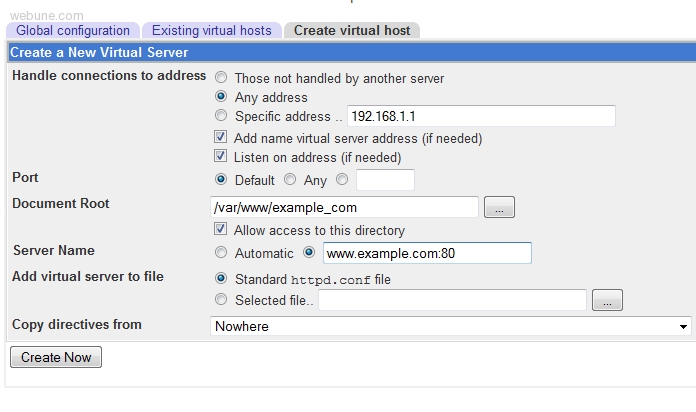
7. When you are in the 'Apache Webserver' section, click on the 'Create Virtual Host' tab
8. Populate the following fields: -
- Handle connections to address [select: Specific Address... [enter the server's ip address]] -
- Port [here you can select Default, Any or specify one. what i did, i specified port 80, so i entered 80] -
- Document Root [here i specified which directory i was going to have this domain's files for this site. so i entered /var/www/html/mydomain but you can enter whatever directory you want to put your web files, its your choice] -
- Server Name [i entered my domain name like this: www.mydomain.com:80 [i included the :80 part also]] -
- Add virtual server to file [leave default as Standard httpd.conf file] -
- Copy directives from [leave default: Nowhere]
9. After you have created the virtual host, you need to save the changes. there is a link "Apply Changes" click on it.
10. Thats it, now you can test it by accessing your new website: //www.example.com
I have been searching Google on how to set up my site on webmin but all were outdated and not detailed.
I followed your guide and everything is ok.
Thanks