What PDM Java Version Do I Need To Access Cisco PIX Firewall?
I Need To Know What Version Of Java Do I Need To Be Able To Open The Cisco The Cisco Pix Device Manager Because It Does Not Open Automatically [2202], Last Updated: Mon Jun 24, 2024
Webune Support
Mon Jan 09, 2012
11 Comments
3511 Visits
Hello, Welcome to Webune Web Hosting
Webune provides dedicated servers with dedicated firewalls and this questions comes up frequently so we are addressing how to resolve this so you can fix it yourself.
problem: when you try to open the PDM in your firewall, the javaruntime does not open, you only see a message that says:
The Cisco PIX Device Manager has started in another browser window. If you wish, you may close this window.
then it says:
Quote:
if you look at the configs box you may have something like this:
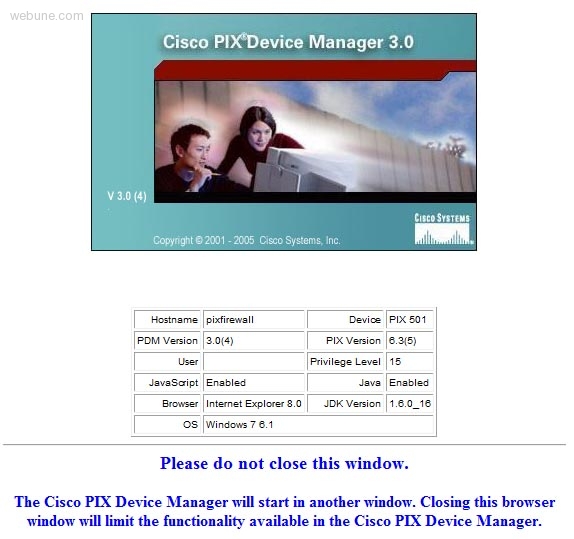
but no other window opens.
how to fix: you will need to download to version 5, be careful not to download version 6 or higher because it will not work. we have tested version 5 and it works ok.
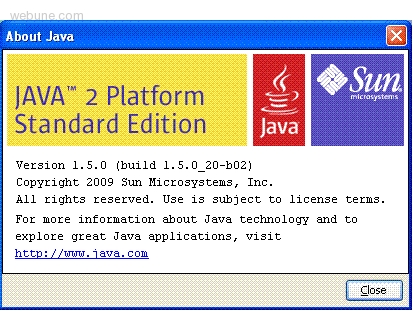
Download: java-jre-1_5_0_20-windows-i586-p.exe at
NEW LINK: (ORACLE bought out SUN, so new link)
https://cds.sun.com/is-bin/INTERSHOP.enfinity/WFS/CDS-CDS_Developer-Site/en_US/-/USD/ViewProductDetail-Start?ProductRef=jre-1.5.0_20-oth-JPR@CDS-CDS_Developer
OLD LINK
http://java.sun.com/javase/downloads/index_jdk5.jsp
install:
once you have download the copy of java runtime install it on your computer with typical installation
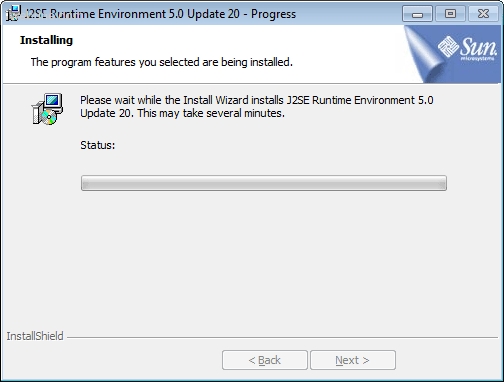
follow each step until you get to the completed installation screen:
done
Webune provides dedicated servers with dedicated firewalls and this questions comes up frequently so we are addressing how to resolve this so you can fix it yourself.
problem: when you try to open the PDM in your firewall, the javaruntime does not open, you only see a message that says:
The Cisco PIX Device Manager has started in another browser window. If you wish, you may close this window.
then it says:
Quote:
Please do not close this window.
The Cisco PIX Device Manager will start in another window. Closing this browser window will limit the functionality available in the Cisco PIX Device Manager.
The Cisco PIX Device Manager will start in another window. Closing this browser window will limit the functionality available in the Cisco PIX Device Manager.
if you look at the configs box you may have something like this:
but no other window opens.
how to fix: you will need to download to version 5, be careful not to download version 6 or higher because it will not work. we have tested version 5 and it works ok.
Download: java-jre-1_5_0_20-windows-i586-p.exe at
NEW LINK: (ORACLE bought out SUN, so new link)
https://cds.sun.com/is-bin/INTERSHOP.enfinity/WFS/CDS-CDS_Developer-Site/en_US/-/USD/ViewProductDetail-Start?ProductRef=jre-1.5.0_20-oth-JPR@CDS-CDS_Developer
OLD LINK
http://java.sun.com/javase/downloads/index_jdk5.jsp
install:
once you have download the copy of java runtime install it on your computer with typical installation
J2SE Runtime Environment 5.0 Update 20 - Progress
Installing
The program features you selected are being installed
Please wait while the Install Wizard installs J2SE Runtime Environment 5.0 Update 20. This may take seeveral minutes.
Status
InstallShield
Installing
The program features you selected are being installed
Please wait while the Install Wizard installs J2SE Runtime Environment 5.0 Update 20. This may take seeveral minutes.
Status
InstallShield
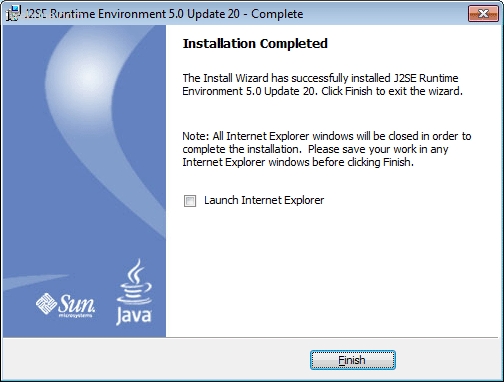
follow each step until you get to the completed installation screen:
J2SE Runtime Environment 5.0 Update 20 - Complete
Installation Completed
The Install Wizard has successfully installed J2SE Runtime Environment 5.0 Update 20. Click Finish to exit the wizard.
Note: All Internet Explorer windows will be closed in order to complete the installation. Please save your workk in any Internet Explorer windows before clicking Finish.
[] Launch Internet Explorer
[ Finish ]
Installation Completed
The Install Wizard has successfully installed J2SE Runtime Environment 5.0 Update 20. Click Finish to exit the wizard.
Note: All Internet Explorer windows will be closed in order to complete the installation. Please save your workk in any Internet Explorer windows before clicking Finish.
[] Launch Internet Explorer
[ Finish ]
done
frastrated
Thu Dec 31, 2009
does this work on windows 7, i followed your instructions and still doesn't do anything, the pdm panel does not come up?
Jim
Thu Jan 28, 2010
thank you, this fixed my problem. i was using the latest ver 6
hector
Mon Feb 01, 2010
what version of java do i need for cisco pix
cnnabber
Sun Apr 11, 2010
i dont think cisco pdm is comptaible on windows 7
https://www.webune.com/forums/what-cisco-pix-firewall-pdm-java-version.html
https://www.webune.com/forums/what-cisco-pix-firewall-pdm-java-version.html
hostman
Tue Apr 20, 2010
i also had the same problem, the reason why the pdm is not compatiable with windows 7 is because windows 7 uses the latest releast of java and you need an older version like 1.5