How To Start Recovery Mode Console Window
This Page Contains information about How To Start Recovery Mode Console Window By Webune in category Windows Hosting with 0 Replies. [1515], Last Updated: Sun Jul 05, 2020
Webune
Sat Sep 19, 2009
0 Comments
426 Visits
this tutorial will show you how you can start your server using the recovery mode console if you have a windows server:
1. insert the windows installation cd and boot of it.
2. once the windows setup starts, Press R for Fecovery Console
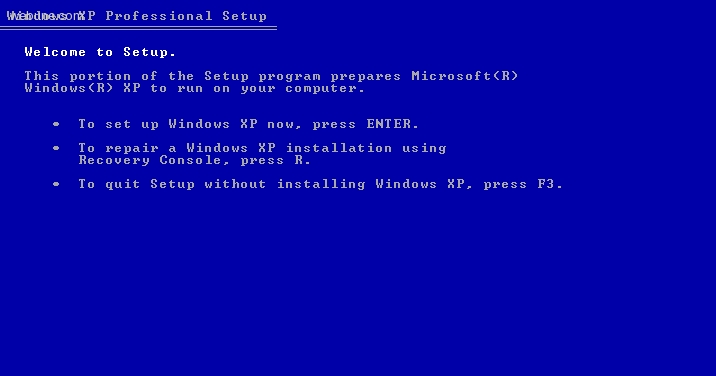
3. you will see a message that says:
4. press 1 and hit Enter to select the first choice
5. after you have selected the installation you want, it will ask you for a password:
NOTE: if you have not setup your system to prompt for an admin password, it will not ask you. otherwise, it will ask you for the administrator password, so you must provide it. if you dont have it, you cannot get into the recovery console.
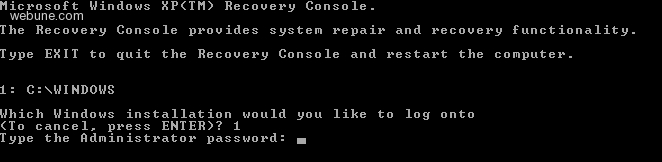
6. once you have entered the correct administrator password, you will see:
C:WINDOS> which means you are in
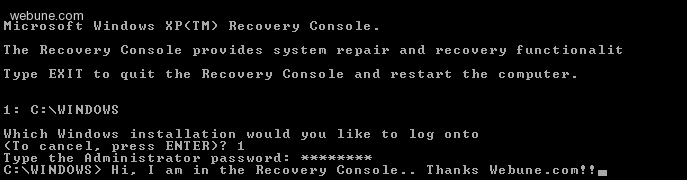
Thats it
1. insert the windows installation cd and boot of it.
2. once the windows setup starts, Press R for Fecovery Console
3. you will see a message that says:
Microsoft WindowsXP Recovery Console.
The Recovery Console provides system repair and recovery functionality.
Type EXIT to quit the Recovery Console and restart the computer.
1: C:WINDOWS
Which WIndows installation would you like to log onto
(To cancel, press ENTER)?
The Recovery Console provides system repair and recovery functionality.
Type EXIT to quit the Recovery Console and restart the computer.
1: C:WINDOWS
Which WIndows installation would you like to log onto
(To cancel, press ENTER)?
4. press 1 and hit Enter to select the first choice
5. after you have selected the installation you want, it will ask you for a password:
NOTE: if you have not setup your system to prompt for an admin password, it will not ask you. otherwise, it will ask you for the administrator password, so you must provide it. if you dont have it, you cannot get into the recovery console.
6. once you have entered the correct administrator password, you will see:
C:WINDOS> which means you are in
Thats it