How To Replace Laptop Hard Drive
This Tutorial Will Show You Step By Step On What You Need To Do To Replace The Hardrive On Your Laptop Replacing Hp Pavilion [739], Last Updated: Sun Jul 05, 2020
Webune Tutorials
Thu Nov 26, 2009
1 Comments
719 Visits
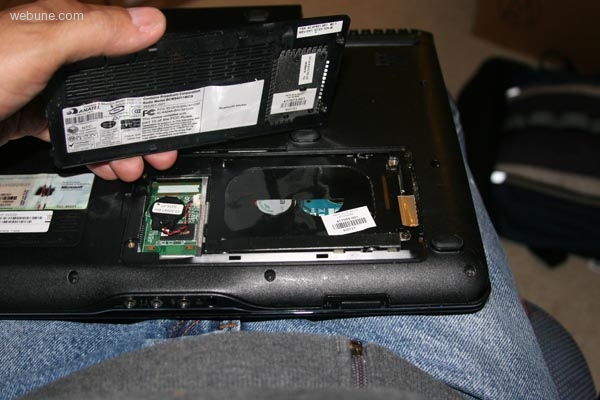
today i wanted to upgrade the hardrive on my hp pavilion dv2000 laptop that i purchase in 2007. it has a SATA drive. i went to best buy, but they only had a PATA drives for laptops.
so in case anyone wants to know how to replace your laptop's hard drive, open the case from the bottom of your laptop, the panel is held by two screws,
when you remove the two screws, there are two black screws holding the hard rive into tha chassis no uncrew them to remove the hardrive.
once you have the hard rive removed, there will be four screws holding the hard drive to the a housing. remove the 4 screws
now you can just remove the black plastic adapter from the hardrive and put it on your new hardrive and install as you removed
thats it
so in case anyone wants to know how to replace your laptop's hard drive, open the case from the bottom of your laptop, the panel is held by two screws,
when you remove the two screws, there are two black screws holding the hard rive into tha chassis no uncrew them to remove the hardrive.
once you have the hard rive removed, there will be four screws holding the hard drive to the a housing. remove the 4 screws
now you can just remove the black plastic adapter from the hardrive and put it on your new hardrive and install as you removed
thats it
jasonmarles
Sun Nov 15, 2009
wow, amazing really good howto on how to replace hard drive in hp pavilion dv2000