PHP Tutorial - How To Enter Data Into A MySQL Database Scripts
in this tutorial we show you how you can enter data into a mysql database using PHP script you can write yourself, we provide examples and step by step instructions you can follow for saving data into a database [655], Last Updated: Mon Jun 24, 2024
webune hosting
Fri Nov 13, 2009
46 Comments
3322 Visits
hello, thanks for visiting webune.com - we host to many websites with php and mysql service.
many of our customers are newbies wanting to learn how to create their own websites. so we created this tutorial on how you can use php and mysql and html to add dynamic webpages to your sites using database. so here we go with the guide:
ok, i will give you a short tutorial...
In this example, lets say i want to collect data from a user. For the purpose of this tutorial guide, i only need the user's name and their email address. so i only need two text fields. one is user_name and the second one is user_email. so this is how the form would look like in HTML:
this is how the form will look like:
HTML FORM
the next step would be to have php check if the form has been submited or not. if the form has been submitted..
the way you can tell if a form has been submitted is to check if our submit button has a value.. if you look closely in our form html. i have this
HTML CODE
as you can see, the name of the submit button is called "Submit" so that the string variable name we can find out if its true or false. to check if the form is submitted i will use the if else operator in php
PHP CODE
ok, on step three, you will need to have the following information, if you dont have this information,,, you will not be able to continue on with this tutorial
if you dont have all these requirements contact you webhosting company.
if you are a Webune customer, contact us and we will be glad to provide this information for you.
the next step involves in us creating some tables in the mysql database.
so login to your database using phpmyadmin. if you are a webune customer, login to the control panel and click on the phpmyadmin link, you will need to login to the database in step 3.
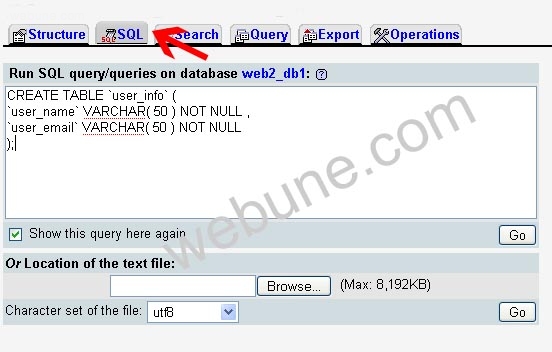
once you are in phpmyadmin click on the SQL tab and copy and past this sql dump into the text area:
this will create a table called user_info in your database, this is where we will enter the information from the form. as you can see, we created two fields, one called user_name and the other one called user_email
its should look something like this on your phpmyadmin
now its time to put the whole thing together.. we wrote up this simple script to show you how you can add. we made this script simple so that you can hack it, modify it or do whatever you want with it so you can practice and how how it all works. one this we ask is that please dont remove the www.webune.com link - we would appreciate it if you dont.
so open your favorite text editor. if you have windows like i do, im using windows xp, open a blank notepad and copy and paste the following php code into it:
webune.php
Now make sure to change the mysql connections settings. so for example, i have these settings. NOTE: this are fake, so make sure to change them, otherwise, this script will error out because it cant connect to the database.
$hostname = "localhost";
$db_user = "webune_user";
$db_password = "mypassword";
$database = "database";
$db_table = "user_info";
as you can see on my example, my hostname is localhost
my database username is webune_user
the password for my database is mypassword my database is database
and my database table is user_info
so now that you have changed these setting to your database credentials, save the notepad file as webune.php
now upload to your php website and open it with your browser, enter the information and once you get a sucess message, the information was entered into the datase.
i tested and it works. if you are a webune customer, you should not have any problems, since this test is done on our servers
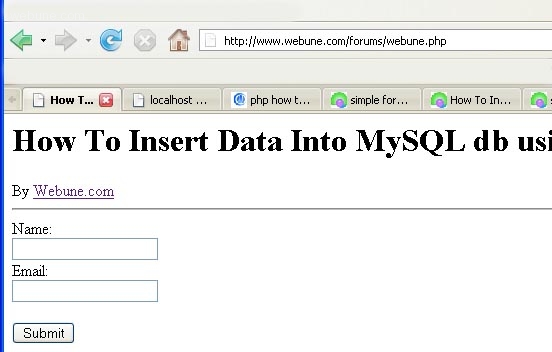
here is how the form looks like in my firefox browser when i open webune.php
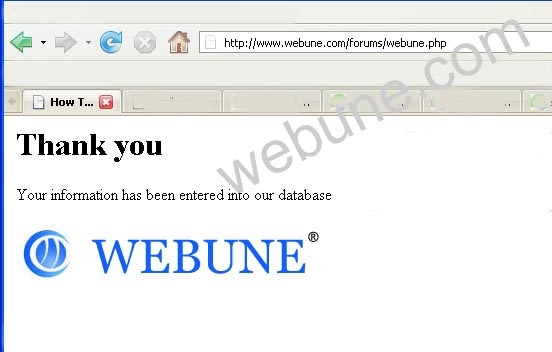
and when i submit the form with my name and email address i get this
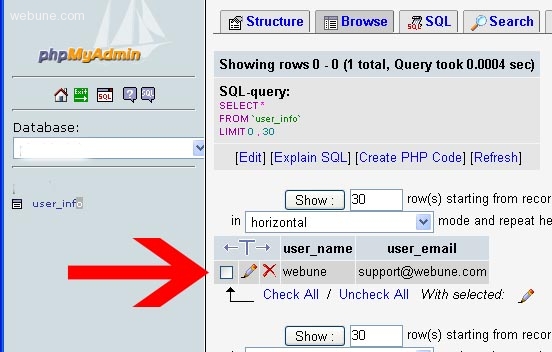
now when i go to my phpmyadmin, i can confirm that the information i've entered on the form, was inserted into my database
done..
i hope this helps you
remember if you need php web hosting
webune has the right service for you
many of our customers are newbies wanting to learn how to create their own websites. so we created this tutorial on how you can use php and mysql and html to add dynamic webpages to your sites using database. so here we go with the guide:
Step 1
ok, i will give you a short tutorial...
In this example, lets say i want to collect data from a user. For the purpose of this tutorial guide, i only need the user's name and their email address. so i only need two text fields. one is user_name and the second one is user_email. so this is how the form would look like in HTML:
this is how the form will look like:
HTML FORM
<form method="post" action="">
Name:<br>
<input type="text" name="user_name">
<br>
Email: <br>
<input type="text" name="user_email">
<br><br>
<input type="submit" name="Submit" value="Submit">
</form>
Name:<br>
<input type="text" name="user_name">
<br>
Email: <br>
<input type="text" name="user_email">
<br><br>
<input type="submit" name="Submit" value="Submit">
</form>
STEP 2
the next step would be to have php check if the form has been submited or not. if the form has been submitted..
the way you can tell if a form has been submitted is to check if our submit button has a value.. if you look closely in our form html. i have this
HTML CODE
<input type="submit" name="Submit" value="Submit">
as you can see, the name of the submit button is called "Submit" so that the string variable name we can find out if its true or false. to check if the form is submitted i will use the if else operator in php
PHP CODE
if (isset($_REQUEST['Submit'])) {
// INSERT DATA FROM FORM ONCE THE FORM HAS BEEN SUBMITTED
} else {
// DISPLAY FORM IF FORM HAS NOT BEEN SUBMITTED
}
// INSERT DATA FROM FORM ONCE THE FORM HAS BEEN SUBMITTED
} else {
// DISPLAY FORM IF FORM HAS NOT BEEN SUBMITTED
}
Step 3
ok, on step three, you will need to have the following information, if you dont have this information,,, you will not be able to continue on with this tutorial
- hostname (usually localhost)
- database user name (if you don't have this contact your host company)
- database user password (if you don't have this contact your host company)
- database name (if you don't have this contact your host company)
- database table name (you create this. you can create a table in phpmyadmin)
if you dont have all these requirements contact you webhosting company.
if you are a Webune customer, contact us and we will be glad to provide this information for you.
Step 4
the next step involves in us creating some tables in the mysql database.
so login to your database using phpmyadmin. if you are a webune customer, login to the control panel and click on the phpmyadmin link, you will need to login to the database in step 3.
once you are in phpmyadmin click on the SQL tab and copy and past this sql dump into the text area:
CREATE TABLE `user_info` (
`user_name` VARCHAR( 50 ) NOT NULL ,
`user_email` VARCHAR( 50 ) NOT NULL
);
`user_name` VARCHAR( 50 ) NOT NULL ,
`user_email` VARCHAR( 50 ) NOT NULL
);
this will create a table called user_info in your database, this is where we will enter the information from the form. as you can see, we created two fields, one called user_name and the other one called user_email
its should look something like this on your phpmyadmin
now its time to put the whole thing together.. we wrote up this simple script to show you how you can add. we made this script simple so that you can hack it, modify it or do whatever you want with it so you can practice and how how it all works. one this we ask is that please dont remove the www.webune.com link - we would appreciate it if you dont.
so open your favorite text editor. if you have windows like i do, im using windows xp, open a blank notepad and copy and paste the following php code into it:
webune.php
<?php
####################################################################
# COPYRIGHT NOTICE:
# THIS SCRIPT CREATED BY WWW.WEBUNE.COM
# PLEASE DONT ERASE THIS
# Copyrights Webune.com
###################################################################
####################################################################
################ DATABASE CONFIGURE ##############################
####################################################################
$hostname = "localhost"; // usually is localhost, but if not sure, check with your hosting company, if you are with webune leave as localhost
$db_user = "username"; // change to your database password
$db_password = "passwd"; // change to your database password
$database = "databse"; // provide your database name
$db_table = "user_info"; // leave this as is
# STOP HERE
####################################################################
# THIS CODE IS USED TO CONNECT TO THE MYSQL DATABASE
$db = mysql_connect($hostname, $db_user, $db_password);
mysql_select_db($database,$db);
?>
<html>
<head>
<title>How To Insert Data Into MySQL db using form in php</title>
</head>
<body>
<?php
if (isset($_REQUEST['Submit'])) {
# THIS CODE TELL MYSQL TO INSERT THE DATA FROM THE FORM INTO YOUR MYSQL TABLE
$sql = "INSERT INTO $db_table(user_name,user_email) values ('".mysql_real_escape_string(stripslashes($_REQUEST['user_name']))."','".mysql_real_escape_string(stripslashes($_REQUEST['user_email']))."')";
if($result = mysql_query($sql ,$db)) {
echo '<h1>Thank you</h1>Your information has been entered into our database<br><br><img src="http://www.webune.com/images/headers/default_logo.jpg"';
} else {
echo "ERROR: ".mysql_error();
}
} else {
?>
<h1>How To Insert Data Into MySQL db using form in php</h1>By <a href="http://www.webune.com">Webune.com</a><hr>
<form method="post" action="">
Name:<br>
<input type="text" name="user_name">
<br>
Email: <br>
<input type="text" name="user_email">
<br><br>
<input type="submit" name="Submit" value="Submit">
</form>
<?php
}
?>
</body>
</html>
####################################################################
# COPYRIGHT NOTICE:
# THIS SCRIPT CREATED BY WWW.WEBUNE.COM
# PLEASE DONT ERASE THIS
# Copyrights Webune.com
###################################################################
####################################################################
################ DATABASE CONFIGURE ##############################
####################################################################
$hostname = "localhost"; // usually is localhost, but if not sure, check with your hosting company, if you are with webune leave as localhost
$db_user = "username"; // change to your database password
$db_password = "passwd"; // change to your database password
$database = "databse"; // provide your database name
$db_table = "user_info"; // leave this as is
# STOP HERE
####################################################################
# THIS CODE IS USED TO CONNECT TO THE MYSQL DATABASE
$db = mysql_connect($hostname, $db_user, $db_password);
mysql_select_db($database,$db);
?>
<html>
<head>
<title>How To Insert Data Into MySQL db using form in php</title>
</head>
<body>
<?php
if (isset($_REQUEST['Submit'])) {
# THIS CODE TELL MYSQL TO INSERT THE DATA FROM THE FORM INTO YOUR MYSQL TABLE
$sql = "INSERT INTO $db_table(user_name,user_email) values ('".mysql_real_escape_string(stripslashes($_REQUEST['user_name']))."','".mysql_real_escape_string(stripslashes($_REQUEST['user_email']))."')";
if($result = mysql_query($sql ,$db)) {
echo '<h1>Thank you</h1>Your information has been entered into our database<br><br><img src="http://www.webune.com/images/headers/default_logo.jpg"';
} else {
echo "ERROR: ".mysql_error();
}
} else {
?>
<h1>How To Insert Data Into MySQL db using form in php</h1>By <a href="http://www.webune.com">Webune.com</a><hr>
<form method="post" action="">
Name:<br>
<input type="text" name="user_name">
<br>
Email: <br>
<input type="text" name="user_email">
<br><br>
<input type="submit" name="Submit" value="Submit">
</form>
<?php
}
?>
</body>
</html>
Now make sure to change the mysql connections settings. so for example, i have these settings. NOTE: this are fake, so make sure to change them, otherwise, this script will error out because it cant connect to the database.
$hostname = "localhost";
$db_user = "webune_user";
$db_password = "mypassword";
$database = "database";
$db_table = "user_info";
as you can see on my example, my hostname is localhost
my database username is webune_user
the password for my database is mypassword my database is database
and my database table is user_info
so now that you have changed these setting to your database credentials, save the notepad file as webune.php
now upload to your php website and open it with your browser, enter the information and once you get a sucess message, the information was entered into the datase.
i tested and it works. if you are a webune customer, you should not have any problems, since this test is done on our servers
here is how the form looks like in my firefox browser when i open webune.php
and when i submit the form with my name and email address i get this
now when i go to my phpmyadmin, i can confirm that the information i've entered on the form, was inserted into my database
done..
i hope this helps you
remember if you need php web hosting
webune has the right service for you
tan
Fri Aug 19, 2011
am experiencing an error that no database is selected while i did include one.
$hostname = "localhost";
$db_user = "root"; //
$db_password = ""; //
$database = "customer";
$db_table = "user_info";
where did i go wrong?
devesh
Wed May 21, 2008
thanks for your tutorial..
these are the best..plz give me information if required further..
https://www.webune.com/forums/php-how-to-enter-data-into-database-with-php-scripts.html
these are the best..plz give me information if required further..
https://www.webune.com/forums/php-how-to-enter-data-into-database-with-php-scripts.html
Rony
Sat May 10, 2008
Thanks for your tutorial. its very much helpful for all of us who fall on problem from php to database. thanks again for your this tutorial. i was searching this type of article from long time.
manoj
Sun Jun 22, 2008
Why this error???
Warning: mysql_connect() [function.mysql-connect]: Access denied for user 'admin'at 'localhost' (using password: YES) in /home/texaskuw/public_html/submit.php on line 19
Warning: mysql_select_db(): supplied argument is not a valid MySQL-Link resource in /home/texaskuw/public_html/submit.php on line 20
How To Insert Data Into MySQL db using form in php
Warning: mysql_connect() [function.mysql-connect]: Access denied for user 'admin'at 'localhost' (using password: YES) in /home/texaskuw/public_html/submit.php on line 19
Warning: mysql_select_db(): supplied argument is not a valid MySQL-Link resource in /home/texaskuw/public_html/submit.php on line 20
How To Insert Data Into MySQL db using form in php
manoj
Sun Jun 22, 2008
Why this error???
Warning: mysql_connect() [function.mysql-connect]: Access denied for user 'admin'at 'localhost' (using password: YES) in /home/texaskuw/public_html/submit.php on line 19
Warning: mysql_select_db(): supplied argument is not a valid MySQL-Link resource in /home/texaskuw/public_html/submit.php on line 20
How To Insert Data Into MySQL db using form in php
Warning: mysql_connect() [function.mysql-connect]: Access denied for user 'admin'at 'localhost' (using password: YES) in /home/texaskuw/public_html/submit.php on line 19
Warning: mysql_select_db(): supplied argument is not a valid MySQL-Link resource in /home/texaskuw/public_html/submit.php on line 20
How To Insert Data Into MySQL db using form in php