Learn How To Find The Apache Version Installed In Windows Server
Finding Out What Version Of Apache You Have Installed In Your Windows Computer Server Is Easy With This Step By Step Tutorial By Webune [1548], Last Updated: Mon Jun 24, 2024
Webune Support
Wed Oct 14, 2009
0 Comments
6318 Visits
Hello, Welcome to Webune Support Forums.
As part of our dedication to excellent suppport. We are writing this short to tutorial to help you get the verision of your apache http web server.
there are many ways to find out what versions of apache you have installed in your windows system. these systems can include windows 2003 server, windows 2008 server, windows xp, windows 2000 etc...
OPTION 1
the first option in finding what version of the apache installation you have installed in your server is to run a phpinfo.php file.
when you run the phpinfo.php file, there will be a section called: apache2handler
- under apache2handler, there is a line where it says:
- Apache Version, this line will tell you what is your version of apache, for example, mine says:
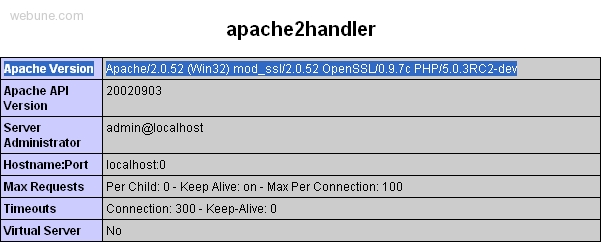
Apache/2.0.52 (Win32) mod_ssl/2.0.52 OpenSSL/0.9.7c PHP/5.0.3RC2-dev
OPTION 2
if you have a mozilla browser, like firefox, you can just try to open page that is not in your website, like for example, http://www.example.com/faketest.html
since the page does not exists, you should get a 404 error if you notice at the bottom of the page it will say:
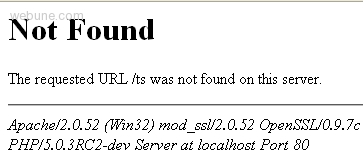
Apache/2.0.52 (Win32) mod_ssl/2.0.52 OpenSSL/0.9.7c PHP/5.0.3RC2-dev Server at localhost Port 80
As part of our dedication to excellent suppport. We are writing this short to tutorial to help you get the verision of your apache http web server.
there are many ways to find out what versions of apache you have installed in your windows system. these systems can include windows 2003 server, windows 2008 server, windows xp, windows 2000 etc...
OPTION 1
the first option in finding what version of the apache installation you have installed in your server is to run a phpinfo.php file.
when you run the phpinfo.php file, there will be a section called: apache2handler
- under apache2handler, there is a line where it says:
- Apache Version, this line will tell you what is your version of apache, for example, mine says:
Apache/2.0.52 (Win32) mod_ssl/2.0.52 OpenSSL/0.9.7c PHP/5.0.3RC2-dev
OPTION 2
if you have a mozilla browser, like firefox, you can just try to open page that is not in your website, like for example, http://www.example.com/faketest.html
since the page does not exists, you should get a 404 error if you notice at the bottom of the page it will say:
Apache/2.0.52 (Win32) mod_ssl/2.0.52 OpenSSL/0.9.7c PHP/5.0.3RC2-dev Server at localhost Port 80