How To Disable The Last Logon In Windows 2003 Server
This Page Contains information about How To Disable The Last Logon In Windows 2003 Server By Webune in category Windows Hosting with 0 Replies. [1493], Last Updated: Mon Jun 24, 2024
Webune
Fri Aug 29, 2008
0 Comments
1244 Visits
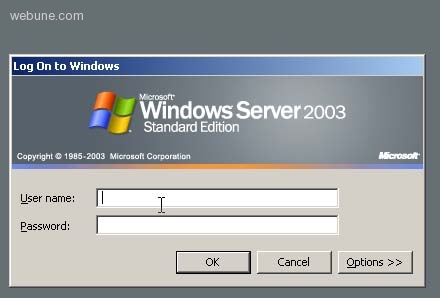
to add more security to your windows server, you can hide the last username who logged in. when you have this enabled, you are actually given the hacker 50% of your authentication information. so you can choose to hide the username on your windows. for example, if you click on control-alt-delete, you will see which username you are currently logged in to.
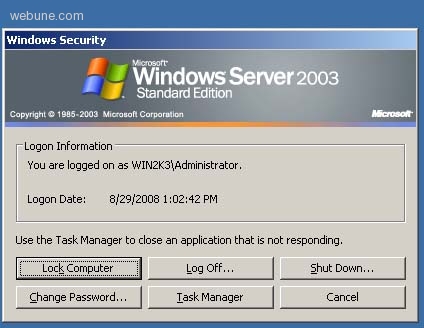
to prevent display of the last logon name in windows server 2003 modify the local seciryt policy and change the interactive logno: do not display last user name option to enabled
follow these steps:
1. log on to your server
2. click on start
3. go to, Administrative toold, local security policy (or domain security policy)
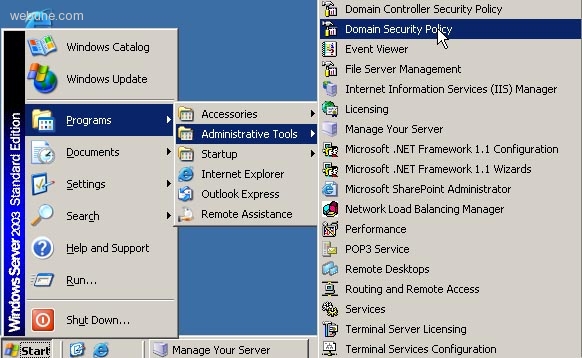
4. expand local policies
5. select security options
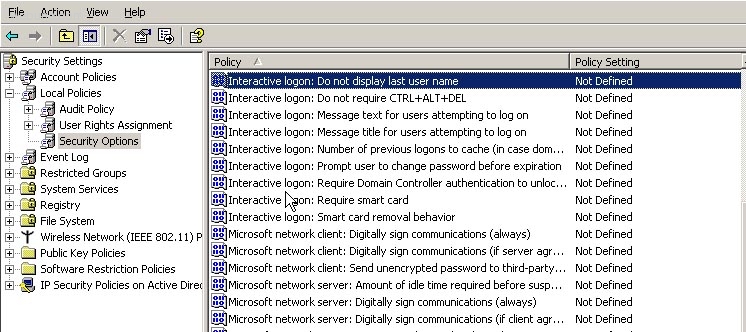
6. double click on interactive logon: do not display last user name
7. select enabled then click ok
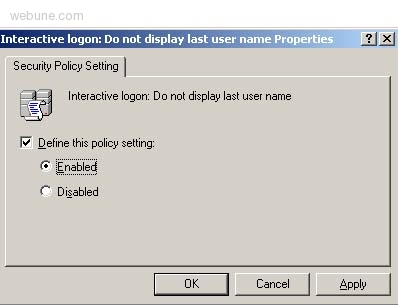
8. now when you enabled this feature, the hacker will not see the last username that logged into your server, thus increasing your security by 50% more.
hope this short step by step howto tutorial helped you
to prevent display of the last logon name in windows server 2003 modify the local seciryt policy and change the interactive logno: do not display last user name option to enabled
follow these steps:
1. log on to your server
2. click on start
3. go to, Administrative toold, local security policy (or domain security policy)
4. expand local policies
5. select security options
6. double click on interactive logon: do not display last user name
7. select enabled then click ok
8. now when you enabled this feature, the hacker will not see the last username that logged into your server, thus increasing your security by 50% more.
hope this short step by step howto tutorial helped you