Error: Oncatalogresults: 0x80029c4a
Can You Help Me Tell Me Why I Get This Error Message Error: Oncatalogresults: 0x80029c4a What Does This Error Mean [1634], Last Updated: Sun Jul 05, 2020
Turolos
Sun Jan 31, 2010
2 Comments
434 Visits
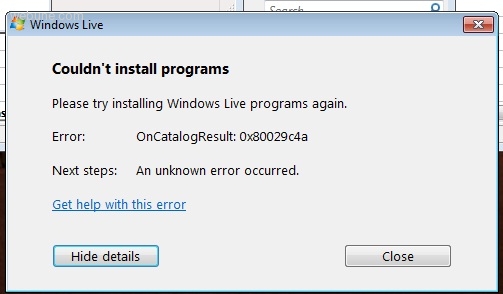
can you help me tell me why i get this error message Error:
OnCatalogResults: 0x80029c4a
what does this error mean? and what can i do to solve it or fix it?
OnCatalogResults: 0x80029c4a
what does this error mean? and what can i do to solve it or fix it?
chingo
Sun Jan 31, 2010
arun
Fri Aug 19, 2011
what is the error 0x80029c4a
when i am downloading any vedio
When you try to install Windows Live programs, you may receive an error message that directs you to this Help topic. The cause of the error is unknown.
Try the following solutions in the order that they're listed.
* Make sure that there are no other programs currently running on your computer.
*
Make sure that your computer has all the latest updates from Microsoft Update.
Show me how
1. Go to the Microsoft Update website.
2. Follow the on-screen instructions to download and install all the latest updates for your computer.
*
If you're installing Windows Live Writer or Windows Live Photo Gallery, make sure that you have the correct prerequisite software installed on your computer.
Show me how
o If you're trying to install Writer on Windows XP, download and install the latest version of Microsoft .NET Framework from the Microsoft .NET Framework website.
o If you're trying to install Photo Gallery, download and install the latest version of SQL 2005 Compact Edition from the SQL 2005 Compact Edition website and the latest version of the Windows Imaging Component from the Windows Imaging Component website. If you're using Windows Vista, you don't need to install the Windows Imaging Component.
* Restart your computer, and then go to the Windows Live Downloads website to retry installing your Windows Live program.
Note
If an error prevents one of your Windows Live programs from upgrading to the latest version, none of your Windows Live programs will be upgraded.
Related topics
Installation is unsuccessful
System requirements
https://www.webune.com/forums/error-oncatalogresults-0x80029c4a.html