Windows Disable: This page contains both secure and nonsecure items
RegisterLogin
Webune Forums » Windows Hosting » Windows Disable: This page contains both secure and nonsecure items
Windows Disable: This page contains both secure and nonsecure items
Post Description: Windows Disable: This page contains both secure and nonsecure items
Tags: Windows, Disable:, This, page, contains, both, secure, and, nonsecure, items
This Post Was Posted On Jul 21, 2010 By pinguin #997
Post Description: Windows Disable: This page contains both secure and nonsecure items
Tags: Windows, Disable:, This, page, contains, both, secure, and, nonsecure, items
This Post Was Posted On Jul 21, 2010 By pinguin #997
Windows Disable: This page contains both secure and nonsecure items by pinguin
Security Information
This page contains both secure and nonsecure items:
Do you want to display the nonsecure items?
Yes No More Info
What can I do to get rid of this popup in my computer.
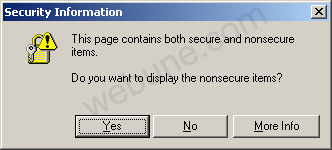
here is the answer:
I will show you how to get rid of this annoying popup window whenever you are visiting secured sites. Follow these steps that have been provided by Webune Support:
If you are a webmaster or have a website and your visitors are complaining to you about this error, visit this post by CLICKING HERE.
If you are a user, and what to get rid of the popup in your computer browser follow these instructions:
Step 1: Go to Tools >> Internet Options

Step 2: Select the "Security" Tab and then click on the "Custom Level" button

Step 3: Scroll down until you see the option: "Display mixed content". Set the option "Enable"

Step 4: Click Ok, Then you will get a "Security Warning" pop-up. Click Yes

Step 5. Click Ok also on the "Interner Options" window that's on your screen.
DONE: Now whenever you visit a secured web page, you will not get the popup you were getting before.
Step by Step Tutorial Guide Provided by: Webune Support
http://www.webune.com
.
Leave Your Comments
saymour
#9218 1
thank you so much, i was trying to figure this out on my own. but i googgled it and it found your answer. now i just have to push it on to my IT web guys to do their job correct.
Nov 22, 2011 Reply Report abuse
omg
#9055 2
there are no words to express my gratefulness, thank you, may the god of your choice bless you very much
Oct 17, 2011 Reply Report abuse
Christina
#5509 3
perfect!! thx so much, and best buy wanted to charge me $200 to fix it!!!
Oct 08, 2011 Reply Report abuse
Dan
#5266 4
thanks a lot for showing me how to get rid of this pita
Jun 16, 2011 Reply Report abuse
Chrissy!
#5057 5
this was a life saver, i go to the same site for work all day long and this message was working my last nerve. thanks!
Apr 27, 2011 Reply Report abuse
Alan
#5028 6
thanks so much. your explanation was clear and the illustrations really made it easy. it worked perfectly on a site i use daily.
Apr 10, 2011 Reply Report abuse
Piya
#4937 7
thanks /give more comment after tested
Mar 23, 2011 Reply Report abuse
Finikito
#4835 8
thanks! it worked!
Feb 14, 2011 Reply Report abuse
Andre
#4805 9
i love you forever, marry me. most annoying prompt ever.
damn it depts and their ie6 love!
Feb 04, 2011 Reply Report abuse
Cathy
#4792 10
wow thanks so very much for the information. you saved my husband and my frustrations. great help. thank you. :o)
Jan 30, 2011 Reply Report abuse
charity
#4785 11
thanks! this won't make my computer less secure will it?
Jan 25, 2011 Reply Report abuse
carol
#4759 12
this was great thanks
Jan 14, 2011 Reply Report abuse
DPK
#4587 13
hi how to do the same configuration in apache 2.0 server.
Nov 02, 2010 Reply Report abuse
SSIM
#4437 14
awesome! it worked! boy, that was getting annoying. thanks
Sep 14, 2010 Reply Report abuse
Pete
#4315 15
you learn something new every day!
many thanks
many thanks
Aug 06, 2010 Reply Report abuse
View More Comments
Leave Your Comments...
©2012 Webune Forums - Wed Dec 12, 2012 11:21 pm
Powered by: Webune Forums V3