Are You Getting A Windows Blue Screen Error With Intelppm.sys
this article will explain why you may be getting the error:Intelppm.sys, also this page is about an error you might be getting in your windows computer system, Im Getting An Error With Windows Xp After Rebooting I See File Intelppm.sys Fails [1592], Last Updated: Sun Jul 05, 2020
Galamad
Sun Dec 06, 2009
10 Comments
2103 Visits
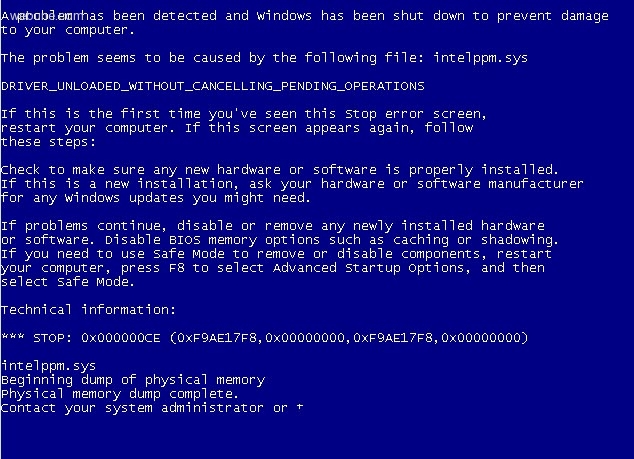
im getting this error on windows xp after i reboot my computer:
A problem has been detected and Windows has been shut down to prevent damage to your
Computer.
The problem seems to be caused by the following file: intelppm.sys
DRIVER_UNLOADED_WITHOUT_CANCELLING_PENDING_OPERATION
If this is the first time you've seen this Stop error screen, restart your computer.
If this screen appears again, follow these steps:
Check to be sure you have adequate disk space. if a driver is identified in the stop message, disable the driver or check with the manufacturer for driver updates. try changing video adapters.
Check with your hardware vendor for any BIOS updates. disable BIOS memory options such as caching or shadowing. if you need to use safe mode to remove or disable components, restart your computer, press f8 to select advanced start-up options and then select safe mode.
Check for viruses on your computer. Remove any newly installed hard drives or hard drive controllers. Check your hard drive to make sure it is properly configured and
terminated. Run chkdisk/f to check for hard drive corruption, and then restart your computer.
Technical information:
STOP:
intelppm.sys
Beginning dump of memory
physical memory dump complete.
Contact your system administrator
A problem has been detected and Windows has been shut down to prevent damage to your
Computer.
The problem seems to be caused by the following file: intelppm.sys
DRIVER_UNLOADED_WITHOUT_CANCELLING_PENDING_OPERATION
If this is the first time you've seen this Stop error screen, restart your computer.
If this screen appears again, follow these steps:
Check to be sure you have adequate disk space. if a driver is identified in the stop message, disable the driver or check with the manufacturer for driver updates. try changing video adapters.
Check with your hardware vendor for any BIOS updates. disable BIOS memory options such as caching or shadowing. if you need to use safe mode to remove or disable components, restart your computer, press f8 to select advanced start-up options and then select safe mode.
Check for viruses on your computer. Remove any newly installed hard drives or hard drive controllers. Check your hard drive to make sure it is properly configured and
terminated. Run chkdisk/f to check for hard drive corruption, and then restart your computer.
Technical information:
STOP:
intelppm.sys
Beginning dump of memory
physical memory dump complete.
Contact your system administrator
john_rathers
Mon Dec 14, 2009
john
Mon Dec 14, 2009
i forgot, just incase for those who can't access teh gui, you can send these commands in your virtual machine:
sc config processor start= disabled
sc config intelppm start= disabled
sc config processor start= disabled
sc config intelppm start= disabled
lanimes
Mon Feb 01, 2010
im using virtualbox in a windows pc i installed windows xp on it. i changed the cpu configuration on the virtual settings now when i boot it gives me this screen. after tweaking i found a way to fix it, but your information was helpful.
i dont think anyone reads these posts anyways. but if someone is interested in knowing how i did it, please let me know and i can post the steps here.
bye
kakadu
Wed Nov 23, 2011
- at - lanimes
because you're wrong. i would like to know. also use virtualbox and had the same error...thanks
because you're wrong. i would like to know. also use virtualbox and had the same error...thanks
tyron
Thu Feb 11, 2010
today i got this:
Problem signature:
Problem Event Name: BlueScreen
OS Version: 6.1.7600.2.0.0.256.1
Locale ID: 1033
Additional information about the problem:
BCCode: 19
BCP1: 00000021
BCP2: 861BF000
BCP3: 00001C28
BCP4: 0000005A
OS Version: 6_1_7600
Service Pack: 0_0
Product: 256_1
Files that help describe the problem:
C:\Windows\Minidump\021110-22760-01.dmp
C:\Users\laptop\AppData\Local\Temp\WER-64288-0.sysdata.xml
Read our privacy statement online:
http://go.microsoft.com/fwlink/?linkid=104288&clcid=0x0409
If the online privacy statement is not available, please read our privacy statement offline:
C:\Windows\system32\en-US\erofflps.txt
Problem signature:
Problem Event Name: BlueScreen
OS Version: 6.1.7600.2.0.0.256.1
Locale ID: 1033
Additional information about the problem:
BCCode: 19
BCP1: 00000021
BCP2: 861BF000
BCP3: 00001C28
BCP4: 0000005A
OS Version: 6_1_7600
Service Pack: 0_0
Product: 256_1
Files that help describe the problem:
C:\Windows\Minidump\021110-22760-01.dmp
C:\Users\laptop\AppData\Local\Temp\WER-64288-0.sysdata.xml
Read our privacy statement online:
http://go.microsoft.com/fwlink/?linkid=104288&clcid=0x0409
If the online privacy statement is not available, please read our privacy statement offline:
C:\Windows\system32\en-US\erofflps.txt
https://www.webune.com/forums/windows-blue-screen-with-intelppmsys.html