How To Disable IIS In A Windows Server From Loading During Boot
This Tutorial Will Show You How You Can Disable IIs From Running When You Server First Start. I will show you the steps for disabling in your windows server using pictures of the configuration settings. [1604], Last Updated: Sun Jul 05, 2020
Webune Tutorials
Tue Dec 08, 2009
17 Comments
2980 Visits
Welcome to Webune Support Forums
We provide Windows Dedicated Server - If you are interested in a secured Windows 2008 server, please contact our sales team
the purpose of this tutorial is to show you how you can disable IIS (Internet Information Services) on your Microsoft Windows Server.
sometimes its helpful because you want to disable it by default because you may have another web server running on your server like apache for example. and you may want to stop IIS from running when you first start your server. With these steps, you can still start your server, because you are not going to be uninstalling it rather, you are just going to stop it from starting at startup of your server.
I will show you how its done by using a windows 7 Computer i have.
first go to the control panel and select Administrative tools

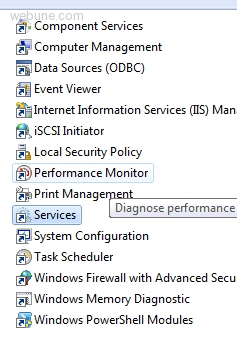
in the administrative tools panel, double click on Services
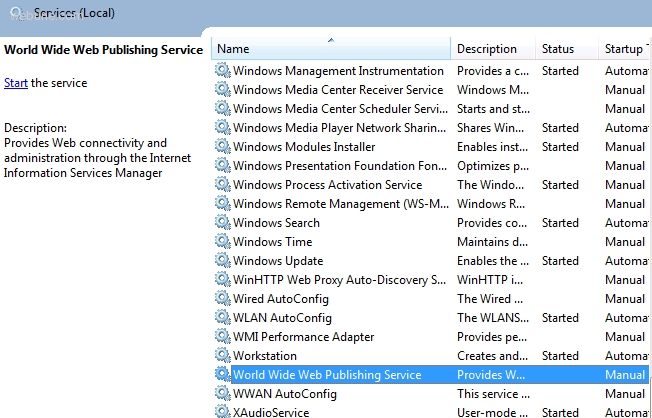
now scroll down to the World Wide Web Publishing Service and right click on World Wide Web Publishing Service and select properties:
under the General tab, in Startup Type - select Manual
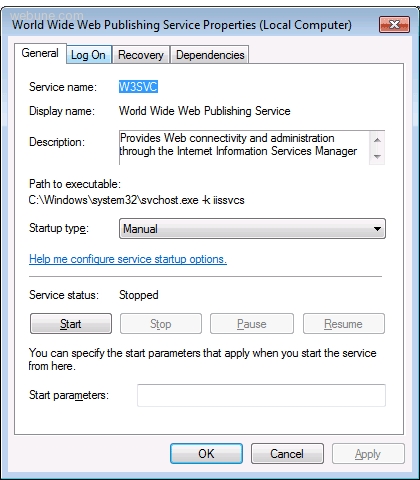
click OK, now when you restart your computer, IIS will not start by default. if you want to start it, you can start it manually.
We provide Windows Dedicated Server - If you are interested in a secured Windows 2008 server, please contact our sales team
the purpose of this tutorial is to show you how you can disable IIS (Internet Information Services) on your Microsoft Windows Server.
sometimes its helpful because you want to disable it by default because you may have another web server running on your server like apache for example. and you may want to stop IIS from running when you first start your server. With these steps, you can still start your server, because you are not going to be uninstalling it rather, you are just going to stop it from starting at startup of your server.
I will show you how its done by using a windows 7 Computer i have.
first go to the control panel and select Administrative tools
in the administrative tools panel, double click on Services
now scroll down to the World Wide Web Publishing Service and right click on World Wide Web Publishing Service and select properties:
under the General tab, in Startup Type - select Manual
click OK, now when you restart your computer, IIS will not start by default. if you want to start it, you can start it manually.
john
Thu Jun 24, 2010
you rock it worked
Liza
Wed Dec 13, 2017
Thank you, it solved the problem :)
Gaurav
Sun Feb 01, 2015
world wide web publishing services is not shown into services.please help
EUNICE
Wed Oct 25, 2017
it was helpful,thanks
Jazy
Sat Sep 24, 2016
Didn't work for me....
rukmalx
Sun Feb 20, 2011