How to Disable 'Press F1 To Continue' Error During Boot
this step by step tutorial guide will show how to fix Press F1 To Continue error you get when your computer is booting up. Will show you with pictures how to configure in the BIOS to fix the error message. [402], Last Updated: Tue Feb 07, 2023
unix
Sun Nov 19, 2006
91 Comments
138272 Visits
Disable Press F1 To Continue
In this simple tutorial, we are going to take you through the steps on how you disable 'Press F1 To Continue' - We are going to cover the follows steps:- Reboot
- Access BIOS
- Change BIOS Settings
- Save BIOS Settings
- Reboot
- Confirm
Troubleshoot Tutorial
Please use this step by step tutorial if you are getting a message when you boot your computer or server. Usually this error is generated by the BIOS (CMOS) on the equipment motherboard. This error can be annoying if you boot your computer remotely and you wait and wait to load the operating system, but it never happens. Click on the start button to demonstrate the instruction on how to disable Press F1 To Continue.
Step 1
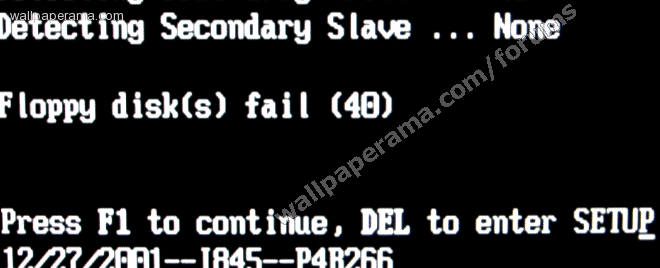
As you can see from this shot i took of my computer, it clearly says Press F1 To Continue. The example I am using here comes from an Intel mother board, with a P4 processor. Its kinda old, but it illustrates the error you are getting. On the next slide, I will show you where you need to go to start disabling Press F1 To Continue.
Step 2
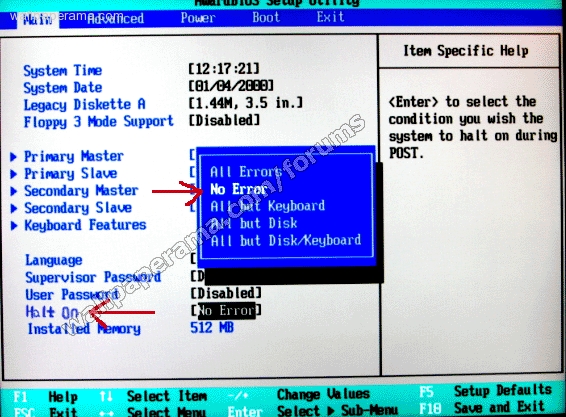
Restart your computer and access the BIOS configuration, in my case, I am going to press "Delete" button. Once I am in the BIOS, I am going to look for the "HALT ON" Option. Select it and choose the "No Errors" Options. To access your BIOS - you can access your BIOS when the computer is starting up. usually pressing F2 or Delete or Esc will give you access to BIOS
Once you are in bios, go into the Boot section and look for anything that would stop the computer if no floppy drive is found.
NOTE: Newer computers don't come with floppy drives, so this should not be an issue with new computers
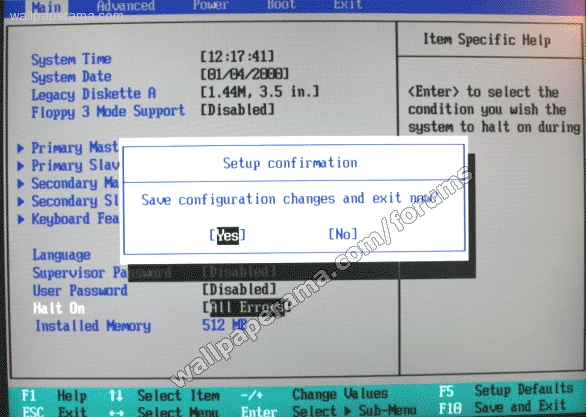
SUMMARY
Yes, its that simple. Older computers came with a floppy disk. These days, floppy disks and floppy drives are a thing of the past. With new motherboards, you will not see these errors anymore, only on older models. If your mother board does not have the settings I just showed you, look for similar settings in your bios. Usually there is a setting that will stop the computer is there is an error found. If you find that settings, disable it. But make sure first that you fixed the problem the computer is experiencing, rather than just ignoring it. It could be a critical component malfunctioning.
Causes
The reason why you are getting this fatal error is because you may have a computer with a floppy drive. in the old days, old computers came with floppy drives, these drives usually had the operating system install and the computer would boot from floppy drives.. I still have my 5 floppy drives to boot windows 2000. Anyway, mother boards came installed by default to first boot from floppy drives and then from the hard drive and then from the CD ROM. But computer now boot from the hard drive as the default. So to fix this, just simply go to your BIOS configuration look for in the boot order menu, put the floppy drive as the last, or if your BIOS allows it, remove it from the boot order and you wont have this issue anymore.How many times have you rebooted a server from a remote location, hoping that it will come back online. Its happens to me a lot. I keep on pinging the server hoping so see reply back, but instead, I wait and wait and all I see are reply time outs.
When I ask my remote hands people, I have them connect a KVM to see what the error message is, only for them to tell me the server is at:
Press F1 To Continue, DEL to enter SETUP
Well, next time this happens to you, tell your remote hands people to disable it. How do you disable it? well, I will show you:Help
i want to help as much people as I can, can you please tell me what kind of machine you are using when you got this error... please.
Manufacturer: (example, HP)
Model (DL360)
Type: (server or pc)
Any other information others can find useful.
Thanks
Trouble Shoot Press F1 To Continue
zakirh2
Sun Nov 27, 2011

Leo
Tue Oct 10, 2017
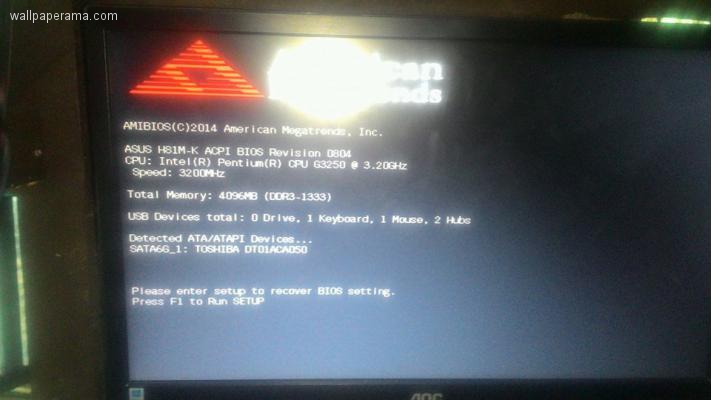
sir please help me how to fix please enter setup to recover BIOS setting please F1 to Run SETUP, i change the battery cmos then i reboot its ok but when shutting down and power again still the same problem ENTER SETUP TO RECOVER BIOS PLEASE TO RUN SETUP... please help me thanks
suraj
Mon Apr 30, 2012

hi thanks dude..!!
its works
i have a problem i could not have display on my monitor. only one dot like " - " blink on screen what can i do.
my laptop is asus i3 and i inslalled win 7 on my pc.
PREM
Sat Dec 15, 2012
First one check directly bios. Run up and down arrows 5 minutes. save bias setting default. Restart the system. Same problem issued? Check your Hard disk.(hdd is temp memory only accepted) So you change hdd.

https://www.wallpaperama.com/forums/how-to-disable-press-f1-to-continue-when-booting-make-change-bios-boot-t482.html