How To Backup Your Cisco Pix Firewall Configuration
This Page Contains information about How To Backup Your Cisco Pix Firewall Configuration By Webune in category Linux Hosting with 9 Replies. [1212], Last Updated: Sun Jul 05, 2020
Webune
Fri Aug 13, 2010
9 Comments
1278 Visits
ok, today i wanted to be able to restore my firewall to the current settings. i have made some changes to my firewall to enforce my security policy in my network.
i have a Cisco Pix Firewall and it comes with Cisco PIX Device Manager. when i try to save my current configuartions, i have three options:
Save Running Configuration To Flash
Save Running Configuration To TFTP Server
Save Running Configuration To Standby Unit
I dont want to save it to flash, cuz i want to save as much memory for the firewall
I dont have a Standby, so my only choice here really is to save it to a FTFP server.
but honestly, i have never used a TFTP server. i am familiar with an FTP server, but not TFTP. so im going to have to find out how i can save it to a TFTP server then. so this is how you would have it, i will show you in this little step by step tutorial guide.
1. the fist step is to make sure you have a TFTP server where you can send the configurations to. so if you dont have TFTP installed in your server, you can learn how to install TFTP by clicking here.
2. now that you have an FTFP server where you can send the configuration file to, we can configure the firewall.
3. login to you firewall and..
- click on the Configuration Button at the top
- Under the Administration Category, select TFTP Server
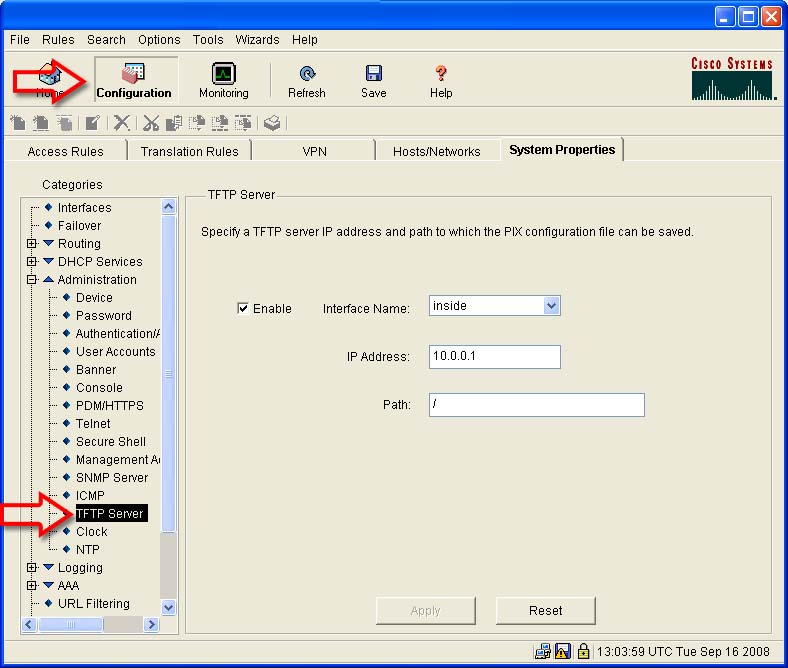
- Select Enable
- Interface Name: Here you have to two choices, Inside and Outside.
.. = Inside - Select inside if your TFTP server is within your network
.. = Outside - Select Outside if you want to save the configurations to a server outside your network, like on the internet
- IP Address: Enter the Ip address of your TFTP server. Since my TFTP server is inside my network and I am using NAT, i will provide the NAT Ip of my server.
Path: Here I put the root directory of my server / means root which on the server is /tftpboot/
4. Click Apply
5. now make sure that you have a file in your TFTP server. so login to your TFTP server and create a file. im goint to call mine My_Backup_File so i just send this command in my linux server:
5.1. For the firewall to be able to save the configuartion file, it needs permission to write, so now you assign write permission to the My_Backup_File
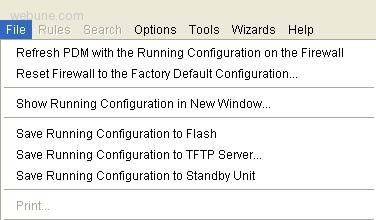
6. now that you have your TFTP server configured in your firewall, you can save your configuration. Just go to File, Save Running Configuration To TFTP Server
7. Now you will see a Save Running Configuration to TFTP Server window
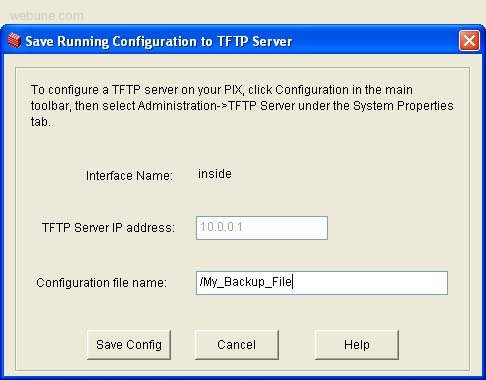
Configuration File Name: /My_Backup_File
Click Save Config
8. after the file has been transfered and saved in your TFTP server, you can view the configurations file by going to your TFTP server and view the file, i use this command:
next time your firewall crashes or your files become corrupted, or if you messed up, you can always configure it back to the way it was.
*If you have a windows server, you can follow this tutorial:
Saving Cisco Configuration to Windows TFTP Server
DONE
Hope this helps you backing up your configs file
Webune Team
i have a Cisco Pix Firewall and it comes with Cisco PIX Device Manager. when i try to save my current configuartions, i have three options:
Save Running Configuration To Flash
Save Running Configuration To TFTP Server
Save Running Configuration To Standby Unit
I dont want to save it to flash, cuz i want to save as much memory for the firewall
I dont have a Standby, so my only choice here really is to save it to a FTFP server.
but honestly, i have never used a TFTP server. i am familiar with an FTP server, but not TFTP. so im going to have to find out how i can save it to a TFTP server then. so this is how you would have it, i will show you in this little step by step tutorial guide.
1. the fist step is to make sure you have a TFTP server where you can send the configurations to. so if you dont have TFTP installed in your server, you can learn how to install TFTP by clicking here.
2. now that you have an FTFP server where you can send the configuration file to, we can configure the firewall.
3. login to you firewall and..
- click on the Configuration Button at the top
- Under the Administration Category, select TFTP Server
- Select Enable
- Interface Name: Here you have to two choices, Inside and Outside.
.. = Inside - Select inside if your TFTP server is within your network
.. = Outside - Select Outside if you want to save the configurations to a server outside your network, like on the internet
- IP Address: Enter the Ip address of your TFTP server. Since my TFTP server is inside my network and I am using NAT, i will provide the NAT Ip of my server.
Path: Here I put the root directory of my server / means root which on the server is /tftpboot/
4. Click Apply
5. now make sure that you have a file in your TFTP server. so login to your TFTP server and create a file. im goint to call mine My_Backup_File so i just send this command in my linux server:
touch /tftpboot/My_Backup_File
5.1. For the firewall to be able to save the configuartion file, it needs permission to write, so now you assign write permission to the My_Backup_File
chmod 777 /tftpboot/My_Backup_File
6. now that you have your TFTP server configured in your firewall, you can save your configuration. Just go to File, Save Running Configuration To TFTP Server
7. Now you will see a Save Running Configuration to TFTP Server window
Configuration File Name: /My_Backup_File
Click Save Config
8. after the file has been transfered and saved in your TFTP server, you can view the configurations file by going to your TFTP server and view the file, i use this command:
cat /tftpboot/My_Backup_File
next time your firewall crashes or your files become corrupted, or if you messed up, you can always configure it back to the way it was.
*If you have a windows server, you can follow this tutorial:
Saving Cisco Configuration to Windows TFTP Server
DONE
Hope this helps you backing up your configs file
Webune Team
sisco_eng.
Wed Apr 29, 2009
miller
Tue May 05, 2009
is there such a thing as a firewall config backup tool? i want to automatically download and save the back ups for my fire wall settings
leni
Mon Jul 13, 2009
how do i get the ftfp server on my server?
webune
Mon Jul 13, 2009
go to this post:
http://www.webune.com/forums/linux-tftp-server-install.html
jonathan
Tue Oct 13, 2009
AMAZING!!! this is exactly what i was looking for. very detailed and the pictures really helped on how to Back up your configuration on a TFTP server step by step. please keep sending me more tutorials
https://www.webune.com/forums/how-to-backup-your-cisco-pix-firewall-configuration.html